



Private AI Chat
- Ask questions without sending prompts into another cloud tool
- Draft, brainstorm, summarize, compare, and explain
- Use from approved devices on your local network
We install a private AI appliance in your office, connect it to the documents you approve, and train your team. Every answer cites the source passage it came from. One-time project price, no per-seat AI subscriptions.
What You Receive
We are a new, founder-led San Diego company. You should not take claims on faith, so the engagement is built around verifiable deliverables you can inspect before and at handoff.
Hardware carries its manufacturer’s warranty. Our work is covered by the written scope and support terms in your proposal.
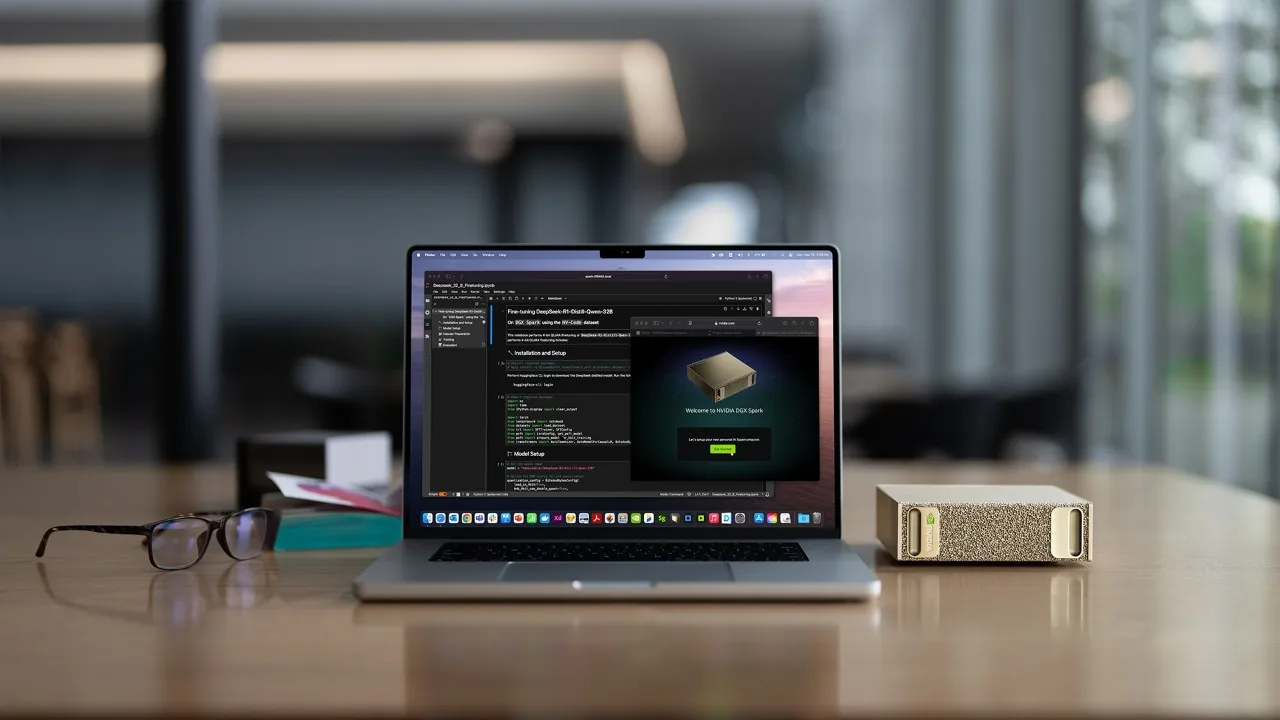
One configured appliance, with the tools a real business uses every day. No assembly required.
Why Own It
Cloud AI is genuinely good at some things. Here is the honest case for owning your AI system instead, with the fine print stated up front rather than hidden.
Core prompt processing, document retrieval, embeddings, and answer generation run on the system you own or control. Your questions and your files are handled by your machine, on your network.
Optional integrations, software updates, remote access, internet search, and temporary support sessions can communicate externally when you configure or authorize them. Every outbound connection is documented in your handoff pack.
You make a planned hardware and implementation investment instead of depending only on variable API bills or per-user subscriptions that can rise every year.
Local is not always cheaper. Real results depend on your user count, current subscriptions, API usage, model selection, hardware price, implementation cost, electricity, support, backups, hardware lifespan, and how heavily you use the system. We will run your numbers with you on a fit call.
Core usage runs on your local network with no internet round trip and no external provider rate limit on locally hosted inference. If your internet goes down, core chat and document Q&A keep working. Performance is sized around the hardware you purchase.
Actual speed depends on the model, quantization, hardware, context length, number of simultaneous users, and workload. We state expected performance for your configuration in writing.
Compatible models, your document collections, user access, system instructions, backup policies, and supported integrations are configured around how your office actually works, then tested against your agreed use cases before handoff.
Not every model runs on every appliance. Model choices are matched to your hardware's memory, your workloads, and license terms during scoping.
Organizations with strict network policies can request an offline or restricted-network configuration as a separately scoped engagement, with update, model installation, and support procedures documented for that environment.
Standard installations are not air-gapped by default. An offline configuration also gives things up, such as internet search and convenient remote support, and we put those trade-offs in writing before you buy.
Because the system is built on open-weight models, you may move among compatible models over time while keeping your hardware, your document index, your interface, your documentation, and your internal workflow.
This is reduced dependence, not zero dependence. Hardware compatibility, model licenses, open-source projects, integrations, and file formats can still create real dependencies.
Where Things Live
No mystery diagram with glowing arrows. This is what stays on your system and exactly which optional connections can reach out, so you can decide what to allow.
Your handoff pack lists every configured connection for your exact installation. We do not claim your data never leaves unless your specific configuration has been scoped and tested to work that way.
A focused 45 to 60 minute call to understand your files, users, goals, space, and budget.
You get a clear recommendation, hardware approach, setup scope, and written quote.
We configure private chat, document Q&A, users, models, security defaults, backups, and handoff docs.
Your system arrives ready to use, with owner training and a support window.
Every system is scoped after a discovery call. Hardware is quoted separately when needed.
For customers who already own compatible local AI hardware.
Local AI runs the AI models on hardware you own or control, inside your own network, instead of sending your prompts and files to a cloud service. You get private chat, document Q&A, and workflow help on a system you can point at.
It depends on the model and the task, and we will tell you which is which. Frontier cloud models may outperform a local system on some complex tasks. Local models perform very well for private chat, drafting, summarization, extraction, classification, and document Q&A. Rather than leaning on public benchmarks, we run an acceptance test against your agreed use cases with your real workflows before handoff, so you see the system pass or fail on the work you actually do.
It depends on the hardware's memory, the model's architecture and quantization, how much context your work needs, the model's license, and how many people use the system at once. Model families change too fast for a published list to stay accurate, so we recommend specific models during scoping, verified against the hardware we are quoting you.
No. Local processing can support goals like data minimization, custody, confidentiality, and governance, but it does not by itself establish HIPAA, GDPR, SOC 2, legal-ethics, or any other regulatory compliance. Those depend on your policies, procedures, and qualified advisors. We provide technology setup and documentation, not compliance certification or legal advice.
Honestly, it depends. Local ownership can become favorable with sustained usage, multiple users, or expensive cloud workflows. Cloud services may cost less for low or occasional usage. Bring your real numbers, like user count, current AI subscriptions, and how heavily your team would use it, to a free fit call and we will run the comparison with you and tell you plainly which way it points.
No, but the system is not maintenance-free and we will not pretend it is. We handle installation, configuration, user setup, backup configuration, documentation, and training. Afterward, someone still owns user changes, running backups and updates, applying security patches, and reacting to a hardware failure. Your ownership pack documents each task, and optional support plans exist if you would rather we handle updates, patches, and remote troubleshooting for you.
Often, yes. We first review your hardware's memory, the model's license, its context and performance characteristics, and whether it actually fits your workflows. If it fits, we install and test it. We do not promise every model on every appliance.
We evaluate before we upgrade. A new model is checked for hardware compatibility, license terms, and behavior on your actual workflows, and your working model is never replaced automatically. If the new model tests better on your use cases, the upgrade is documented and your previous configuration remains restorable.
Core prompt processing, document indexing, and answer generation run on your local system. Optional connections such as software updates, temporary remote support, internet search, and integrations can communicate externally when you configure or authorize them, and each one is listed in your handoff pack. We do not claim data never leaves unless your specific configuration has been scoped and tested to operate that way.
No. The appliance is compact and built for a desk, a shelf, or a small cabinet near your network. It is a product-scale system, not a data center project.
Often, yes. If you own a compatible local AI workstation, the Setup Pack configures the full software stack on it. We confirm compatibility during the discovery call.
It depends on scope. After the discovery call you get a clear timeline in writing alongside the quote, and the system arrives configured and ready to use.
Start here
Tell us about your work and your files. We review your goals and respond with clear next steps. No pressure, no obligation.